
Snapshots
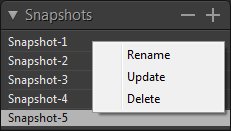 A snapshot is a freeze-frame of your photo at that moment in time. It’s a way to save all of your edit settings at a certain point in case you ever wanted to revert back to them. You can create several snapshots to compare different versions of a photo.
Add a snapshot
Select an earlier state or the current state of your photo in the History panel. Click the Create button  in the Snapshots panel header or press [N].
View a snapshot
Just click the snapshot in the Snapshots panel.
Delete a snapshot
In the Snapshots panel, select the snapshot and click the Delete button  in the panel header, or right click it and choose "Delete".
Rename a snapshot
Right click the snapshot and choose "Rename".
Update a snapshot
Right click the snapshot and choose "Update".
Copyright©Chengzhu Li, 2009-2026. All rights reserved.
Photoshop&Lightroom are trademarks of Adobe Systems Inc.
Photoshop&Lightroom are trademarks of Adobe Systems Inc.