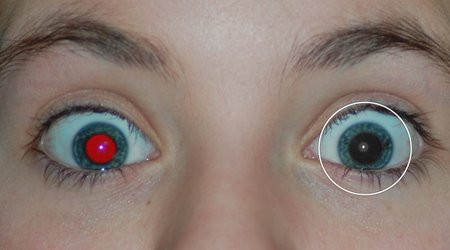
Free Red-eye Reduction Tool

Free Red-eye Reduction Tool - Logo - Icon

Download Free Red-eye Reduction Tool

The red-eye effect in photography is the common appearance of red pupils in color photographs of eyes.

Free Red-eye Reduction Tool is a photo correction tool. With this Red-eye Reduction Tool you can remove a common "red-eye" effect from your digital photos with very simple steps. Just use your mouse to drag and select one red-eye, then all unwanted effect will be fixed automatically. Users don't need to accurately select the red-eye area. Red-eye Reduction Tool's Smart Red Eye Detection Algorithm will find out the exact red-eye region. No other areas will be affected.

If you need more photo editing features, you may want to try the all-in-one photo editor - Photo Toolbox.


Screenshot


Free Red-eye Reduction Tool - Screenshot More Info

Instructions


You can remove red eye from an image using the Red-eye Reduction tool very easily. The red eye reduction tool automatically changes the saturation and brightness of the area you selected without removing detail from the image.
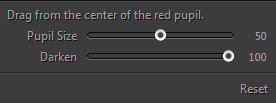
To remove red eye using the red eye reduction tool:

1. Run Free Red-eye Reduction Tool from the desktop or start-menu.

2. Use the zoom tool to enlarge the red-eye area of the image you want to retouch.

3. Press the left-mouse-button and drag the mouse(creating a selecting box) to select one red-eye.

4. After releasing the mouse button, the selected red-eye will be fixed automatically.

5. If the fixed eye is not dark enough, increase the 'Darken Amount' setting in the options bar, and try again.

Copyright©PHOTO-TOOLBOX.COM, 2009-2013. All rights reserved.
All the source pictures used in the examples are collected from the internet.

Affiliate & Reseller | Term of Use | Privacy Policy